Ideas, made presentable
About Tertin
Tertin is an AI presentation maker by NerfedLab.
Prepare a client pitch, explain a product decision or build a training session. Start with an AI draft, then shape the story and design with direct editing on the canvas.
Your presentation, down to the details
From a first draft to work you can present
A useful deck needs the right message and the right emphasis. Refine the words, adjust the design and prepare your delivery in one editor.
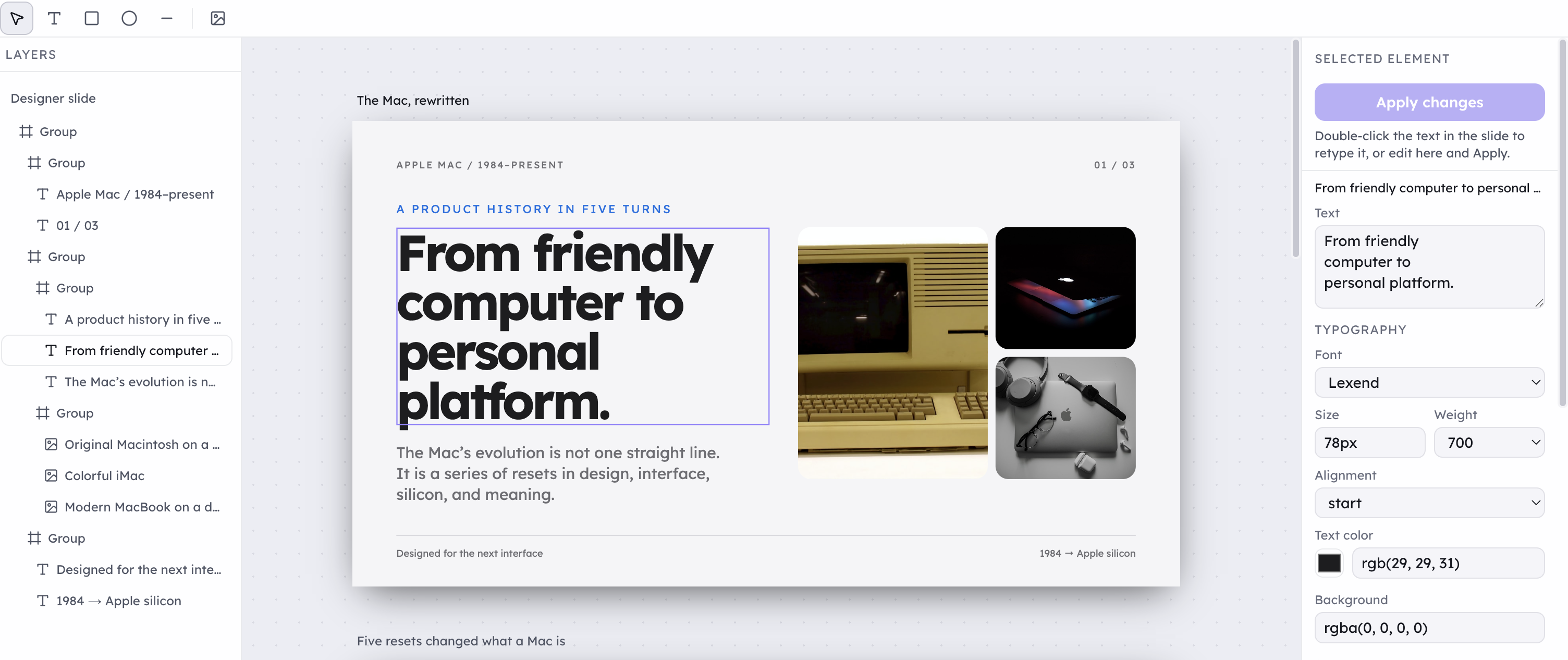
Control the visual details
Adjust typography, layout, colors and images. Use layers to select the element you want to refine without losing sight of the whole slide.
Edit HTML slides directly
Retype text on the slide or use the selected element controls. Open the slide's HTML source when you want to work with its code.
Refine the story in conversation
Give the AI context, ask for changes and review any source references included in its responses. Check the facts before using them in your presentation.
Reuse your own visual style
Save a personal design system for future decks. These saved styles and slide masters live in your browser, under your account.
Explain ideas with data
Create slides with charts and tables alongside text, images and shapes. Choose the format that helps your audience understand the point.
Prepare your delivery
Add speaker notes to individual slides and read them in the presenter view while you talk through the deck.
Available editing controls depend on the slide format and selected element.
From a brief to a finished deck
Describe
Start with the subject of your presentation and what you want it to communicate.
Clarify
Answer follow-up questions to give the AI more context about the deck you need.
Generate
Let AI turn your brief into a first version of the slides.
Edit
Refine the content and design with AI, or make changes yourself on the canvas.
Export
Choose an available download format, then review the file before sharing or presenting.
Made with Tertin
Two example slides rendered with Tertin. Photographs from Unsplash.


Product questions, answered
Current product facts, checked on .
- What is Tertin?
- Tertin is an AI presentation maker by NerfedLab. Describe the deck you need, answer any follow-up questions, and use AI to create and revise slides. You can also edit your presentation directly on the canvas.
- Do I need an account to create a presentation?
- Yes. Sign in with Google to create presentations on tertin.com. You can read this page and the public guide without signing in.
- Can I edit AI-generated slides?
- Yes. Ask AI to revise your presentation or use Manual mode to make changes on the canvas. HTML-based slides can also be edited in Tertin.
- Which file formats can I download?
- The Share menu offers PowerPoint (.pptx), PDF (.pdf) and a web page (.html). HTML Designer slides currently have a PowerPoint and PDF export issue, so use the HTML download for those slides. Review every downloaded file in the app you will present from.
- What are the current price and generation limits?
- There is no paid subscription or self-service checkout yet. New accounts receive a one-time allowance of 250 credits for AI use. Credits do not renew automatically, and new AI requests pause when the balance runs out. This allowance is not a fixed number of slides.